Dockerized JTango server's
The goal of this page is to describe the way of running the Tango CS as a docker containers with the example Device Server (base on the JTango).
This document gives a step-by-step guide to prepare the local environment ready for development purposes.
Pre-requirements
Software that is required to reproduce this guide.
JTango general requirements
| Software | Version |
|---|---|
| Java | 8 |
| Maven | 3 |
Docker requirements
| Software | Version |
|---|---|
| Docker Engine | 19.03 |
| Docker Compose | 3.8 |
Only for windows OS
| Software | Version |
|---|---|
| Docker Desktop (optional) | 2.5.0.1 |
| XMing | 1.20 |
Also is required the https://gitlab.com/tango-controls/JTango repository cloned to the workstation.
Building the example JTango device server
As an example, device server the org.tango.server.testserver.TestDevice was selected to present the:
- generation the .jar
- building the image
- installation and running a new device server in the Tango CS
Prepare the Device Server jar file
This example device server can be replaced by any of the classes in the org.tango.server.testserver package.
Also, new JTango server implementation can be provided in a custom *.jar file, is only one condition
the file name should start with JTangoServer-*.jar, and user should copy this file in the docker folder.
To generate the .jar file (provided by the JTango) use command:
mvn clean install
This will generate the JTangoServer-${VERSION}-jar-with-dependencies.jar in the docker directory.
Logging configuration
The configuration can be done by modifying the docker/logback.xml file to change output destination(e.g. file or console), log pattern, and which information should be logged.
The example configuration will log only warn/error from all classes to the console.
Build the Device Server Docker image
In the docker folder, the Dockerfile was prepared.
By using this file docker will build the new Device Server Docker image.
This file defines the system variables name DEVICE_SERVER_CLASS. The default is the TestDevice class.
ENV DEVICE_SERVER_CLASS org.tango.server.testserver.TestDevice
To run the custom device server, this value can be changed (in this file) to provide information about what device server we want to run. Also, is possible to override this variable during starting the container:
-e DEVICE_SERVER_CLASS=org.custom.CustomClass
To build the docker image is need to run in the docker folder following command:
cd docker
docker build -t jtango-test:latest .
Starting the local environment
To run the built image in the previous step is need to start the Tango CS. For this purpose, the docker-compose.yml file was prepared. This file will start:
- docker_tango-cs - container with the Tango host
- docker_tango-db - container with the Tango db
- docker_tango-jive - jive application to work with Tango CS
Before starting the Tango CS, in Windows OS user must start the XMing X server. See: http://www.straightrunning.com/XmingNotes/
Is also need to update the 34 line in the docker-compose.yml file:
#FIXME
- DISPLAY=${YOUR_WORKSTATION_IP_ADDRESS}:0.0
with the IP address of your workstation (right click on Xming icon in the taskbar and View Log).
After that run the command:
docker-compose up
Docker containers should start. To run the Jive GUI, click on the docker_tango-jive_1 docker service in the Docker Desktop GUI
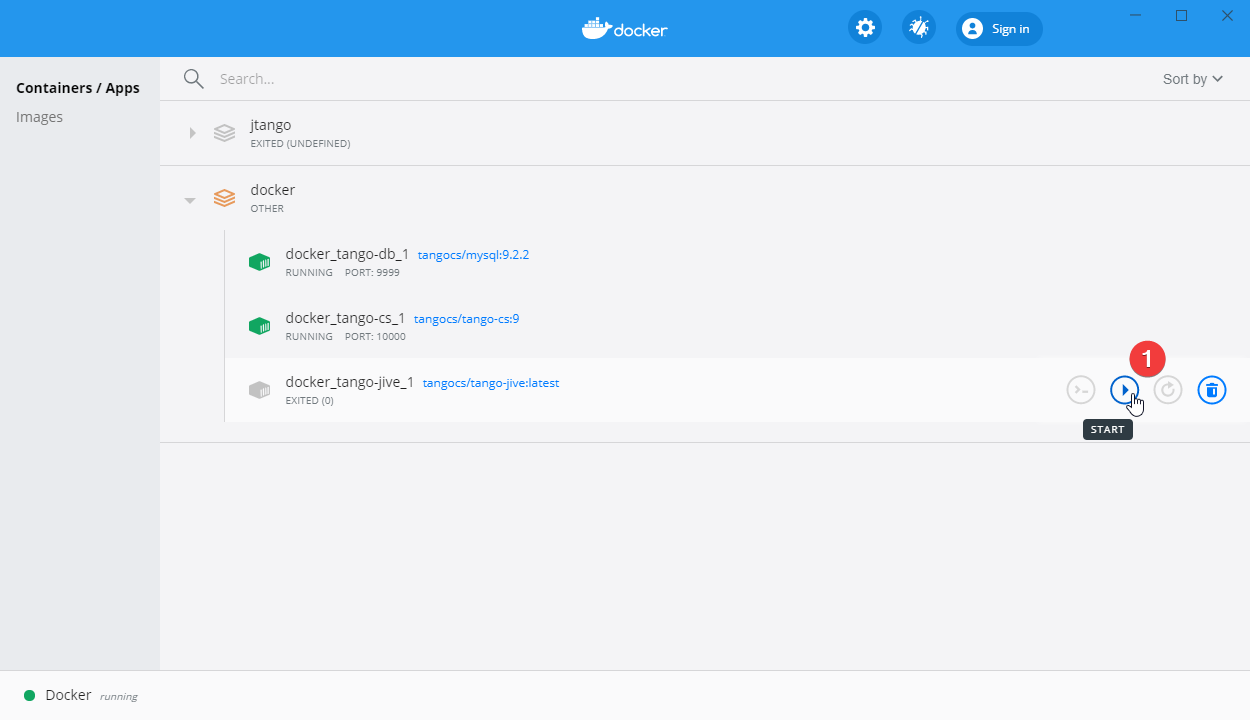
or run the command:
docker start docker_tango-jive_1
Device Server Wizard
To install and run new device server follow the
https://tango-controls.readthedocs.io/en/latest/tutorials-and-howtos/how-tos/how-to-start-device-server.html instruction.
First user must register a new device server:

Run the device in the docker container executing the command described in the section Run example Test Device (this is after the 'Wizard - step 2 - starting the device server' step in the reference guide).
Next select the proper class for the new device and register it in the Tango CS.
Run example Test Device
Now is time to run the device server, if instance name is not set in device server class code, environmental variable INSTANCE_NAME have to be added to the line below (e.g. -e INSTANCE_NAME=1):
docker run -d -e TANGO_HOST=tango-cs:10000 -e DEVICE_SERVER_CLASS=org.tango.server.testserver.TestDevice --network docker_default --name jtango-test jtango-test:latest
where:
- -d - run container in detach mode (to not block the console)
- -e TANGO_HOST=tango-cs:10000 - is a TANGO_HOST system environment pointed to tango-cs container
- -e DEVICE_SERVER_CLASS=org.tango.server.testserver.TestDevice - device server class to run
- --network docker_default - attaching Test Device container to the jtango network (use by the Tango CS)
- --name jtango-test - name of the container
- jtango-test:latest - docker image (if we produce image with a different name this param should be updated)